






Condition: Between two times
ConditionNo. 9160
Synopsis
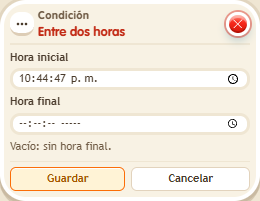
Choose a start time and an end time; the window repeats every day. To pick a specific time zone, use  Condition: Time matches. Ideal for opening areas, events or rewards only at certain hours.
Step by step
Open a daily time window
Boxes you need
 TriggerTrigger: Say something
- ConditionCondition: Between two times
 EffectEffect: Show message
- Stack “Says something” 9111, this condition and “Show message” 9185. Set the trigger to “hello”, exact match; set the effect to “Matched”, targeting the triggering user.
- Set the condition’s start to 09:00:00 and end to 18:00:00. Save everything.
- Say “hello” inside that window and again outside it. To check it now, temporarily save a window that includes your current time; then restore 09:00 to 18:00.
Result: The message appears inside the saved time window.
Settings
Notes
- The window repeats daily; it is not a booking for a specific date. Use “Time matches” 9173 to select an explicit time zone.