






Trigger: Object state changes
TriggerNo. 9125
Synopsis
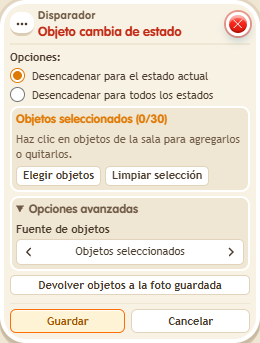
Select the object and tick “Trigger for all states” to react to any change. In BoomBang only dice, roulettes and the  Circuits clock have states. To roll a die from circuits use
  Effect: Random state:
  Effect: Change state does not roll it.
Step by step
Announce a changed die
Boxes you need
- TriggerTrigger: Object state changes
 TriggerTrigger: Say something
 SelectorSelector: Users by name
- EffectEffect: Random state
 EffectEffect: Show message
- Prepare a die and a “Says something” 9111 = “roll” + “Random state” 9189 stack, selecting the die.
- In another stack, select that die in this box and choose “Trigger for all states”. Add “Users by name” 9249 with your name and “Show message” 9185, text “Changed”, targeting “Users from selector”. Save.
- Say “roll” several times, waiting for each roll to finish.
Result: A change in the die state triggers “Changed”.
Settings
Notes
- Use “Random state” to roll a die; “Toggle state” does not roll it.